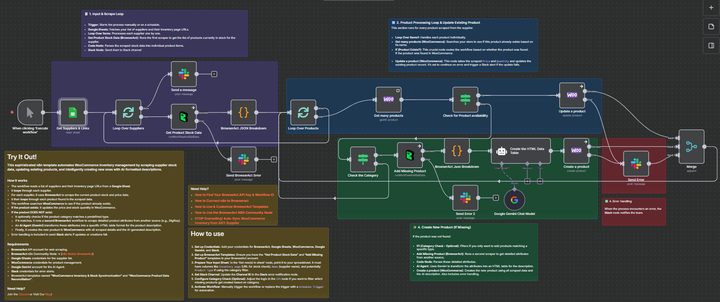
Synchronizing WooCommerce Inventory and Creating Products with Google Gemini AI and BrowserAct
Curated by n8n Markets team
Last updated: March 8, 2026
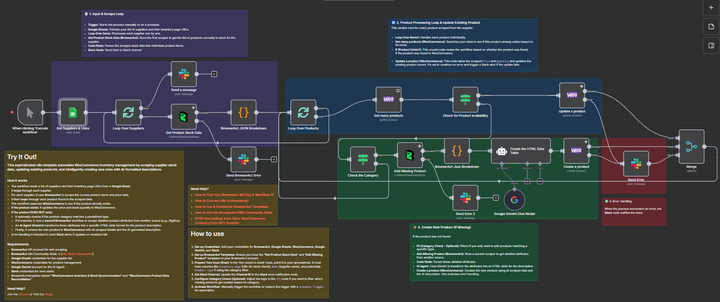 ## Synchronize WooCommerce Inventory & Create Products with Gemini AI & BrowserAct ### This sophisticated n8n template automates WooCommerce inventory management by scraping supplier data, updating existing products, and intelligently creating new ones with AI-formatted descriptions. This workflow is essential for e-commerce operators, dropshippers, and inventory managers who need to ensure their product pricing and stock levels are synchronized with multiple third-party suppliers, minimizing overselling and maximizing profit. --- ### Self-Hosted Only This Workflow uses a community contribution and is designed and tested for self-hosted n8n instances only. --- ### How it works * The workflow is typically run by a Schedule Trigger (though a Manual Trigger is also shown) to check stock automatically. * It reads a list of suppliers and their inventory page URLs from a central Google Sheet. * The workflow loops through each supplier: * A BrowserAct node scrapes the current stock and price data from the supplier's inventory page. * A Code node parses this bulk data into individual product items. * It then loops through each individual product found. * The workflow checks WooCommerce to see if the product already exists based on its name. * If the product exists: It proceeds to update the existing product's price and stock quantity. * If the product DOES NOT exist: * An If node checks if the missing product's category matches a predefined type (optional filtering). * If it passes the filter, a second BrowserAct workflow scrapes detailed product attributes from a dedicated product page (e.g., DigiKey). * An AI Agent (Gemini) transforms these attributes into a specific, styled HTML table for the product description. * Finally, the product is created in WooCommerce with all scraped details and the AI-generated description. * Error Handling: Multiple Slack nodes are configured to alert your team immediately if any scraping task fails or if the product update/creation process encounters an issue. Note: This workflow does not support image uploads for new products. To enable this functionality, you must modify both the n8n and BrowserAct workflows. --- ### Requirements * BrowserAct API account for web scraping * BrowserAct n8n Community Node -> ([n8n Nodes BrowserAct](https://www.npmjs.com/package/n8n-nodes-browseract-workflows)) * BrowserAct templates named “WooCommerce Inventory & Stock Synchronization” and “WooCommerce Product Data Reconciliation” * Google Sheets credentials for the supplier list * WooCommerce credentials for product management * Google Gemini account for the AI Agent * Slack credentials for error alerts --- ### Need Help? * #### [How to Find Your BrowseAct API Key & Workflow ID](https://www.youtube.com/watch?v=pDjoZWEsZlE) * #### [How to Connect n8n to Browseract](https://www.youtube.com/watch?v=RoYMdJaRdcQ) * #### [How to Use & Customize BrowserAct Templates](https://www.youtube.com/watch?v=CPZHFUASncY) * #### [How to Use the BrowserAct N8N Community Node](https://youtu.be/j0Nlba2pRLU) --- ### Workflow Guidance and Showcase * #### [STOP Overselling! Auto-Sync WooCommerce Inventory from ANY Supplier](https://youtu.be/khLtyM2ktoU)
What's Included
- Complete n8n workflow template with 0 nodes. Ready to import and customize.
Requirements
n8n instance (self-hosted or cloud). credentials.
How to Use
1. Download the workflow JSON 2. Import into your n8n instance 3. Configure credentials for 4. Activate and enjoy automation
Apps in this n8n workflow
How to import this template into n8n
- Download the workflow JSON file from this page.
- In n8n, open Workflows, create a new workflow and choose Import from File.
- Open each node that shows a warning and connect your own credentials.
- Run the workflow once manually to check the output before you activate it.
- Importable n8n workflow JSON file
- Download with Builder Pro or Agency Unlimited
- Built for n8n v1.0++
- Setup time: 5-15 min
Included in Builder Pro — $19/mo, 4,177 premium workflows
Before you activate
Templates are reviewed before they are listed. Test with your own credentials and data before running it in production.
100% Secure Checkout
Refund requests within 7 days of a new subscription
Dependencies & Requirements
⚠️ 1 service require credentials. Make sure you have accounts set up before importing.
0 reviews
No reviews yet.
Questions & Answers
Log in to ask a question.
No questions yet. Be the first to ask!
People Also Bought
Related Automation n8n templates
- Generate AI Videos with Google Veo3, Save to Google Drive and Upload to YouTube
- Scrape and summarize webpages with AI
- Create a Branded AI-Powered Website Chatbot
- Angie, Personal AI Assistant with Telegram Voice and Text
- AI agent chat
- Automated Web Scraping: email a CSV, save to Google Sheets & Microsoft Excel
- Respond to WhatsApp Messages with AI Like a Pro!
- Basic Automatic Gmail Email Labelling with OpenAI and Gmail API