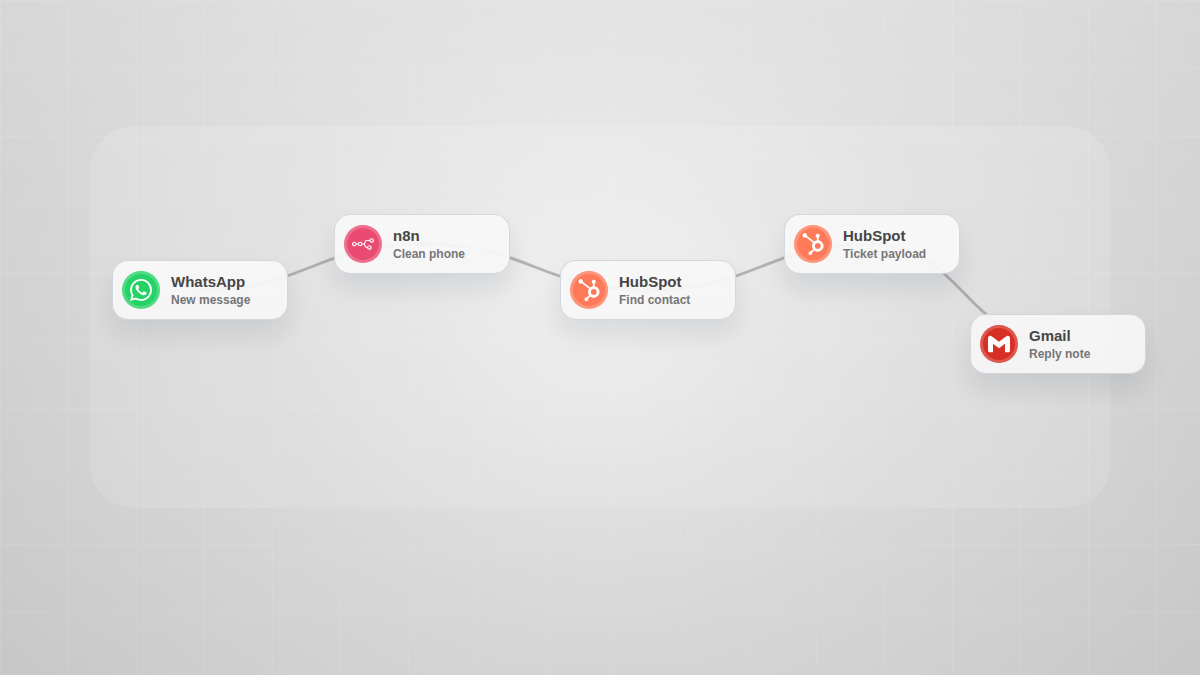
GHL WhatsApp to HubSpot Ticket Router
Curated by n8n Markets team
Last updated: July 23, 2026
Route GoHighLevel WhatsApp messages into HubSpot ticket handoffs without orphan tickets: normalize phone, search contact, prepare the ticket payload, and return a clean review result. Why this sells: - Stops WhatsApp support messages from becoming disconnected HubSpot tickets. - Shows exactly when a contact match is missing before a ticket is created. - Fits agencies and service teams using GoHighLevel plus HubSpot. What the buyer gets: - Ready-to-import n8n workflow JSON. - Marketplace-ready visual in the n8n canvas style. - Clear environment-variable setup notes. - Safer placeholders instead of private credentials. No revenue, accuracy, legal, finance, or operational result is guaranteed. Test the workflow with your own credentials and real data before production use.
What's Included
- Importable n8n workflow JSON.
- One primary marketplace image.
- Setup instructions with environment variables.
- Safe placeholder endpoints and no private credentials.
- Suggested test payload notes inside the workflow.
Requirements
n8n 1.0+ cloud or self-hosted. HubSpot private app token in HUBSPOT_PRIVATE_APP_TOKEN. GoHighLevel or WhatsApp webhook payload containing phone and message fields. Confirm the HubSpot association type ID for your portal before live use.
How to Use
Import the workflow JSON into n8n. Set HUBSPOT_PRIVATE_APP_TOKEN as an n8n environment variable or replace the Authorization header with an n8n credential. Point the GoHighLevel WhatsApp webhook to the workflow webhook URL. Send a test message with contact_phone and message_body. Check the orphanRisk and hubspotTicketPayload fields before activating.
Apps in this n8n workflow
How to import this template into n8n
- Download the workflow JSON file from this page.
- In n8n, open Workflows, create a new workflow and choose Import from File.
- Open each node that shows a warning and connect your own credentials.
- Run the workflow once manually to check the output before you activate it.
- Importable n8n workflow JSON file
- Download with Builder Pro or Agency Unlimited
- Built for n8n v1.0++
- Setup time: 15 minutes
Included in Builder Pro — $19/mo, 4,177 premium workflows
Before you activate
Templates are reviewed before they are listed. Test with your own credentials and data before running it in production.
100% Secure Checkout
Refund requests within 7 days of a new subscription
Dependencies & Requirements
⚠️ 1 service require credentials. Make sure you have accounts set up before importing.
0 reviews
No reviews yet.
Questions & Answers
Log in to ask a question.
No questions yet. Be the first to ask!
People Also Bought
Related CRM Integration n8n templates
- Summarize Reply To Slack Channel Messages With Claude AI Assistant
- SALES — Lead Capture & CRM Auto-Sync
- AI Customer Support Agent — GPT-Powered Webhook Chatbot
- AI Customer Support Automation — CRM + RAG + Multi-Agent AI
- Automated NPS Survey Suite & Google Sheets Feedback Tracker
- Real Estate AI Lead Qualifier — Instant Scoring & Follow-Up for Every Website Lead
- Real Estate AI Lead Qualifier — Instant Scoring & Follow-Up for Every Website Lead
- AI Cold Email Outreach Machine | n8n GPT-4 Personalized Email Bot