Automate Product Training & Customer Support via WhatsApp, GPT-4 & Google Sheets
Curated by n8n Markets team
Last updated: March 8, 2026
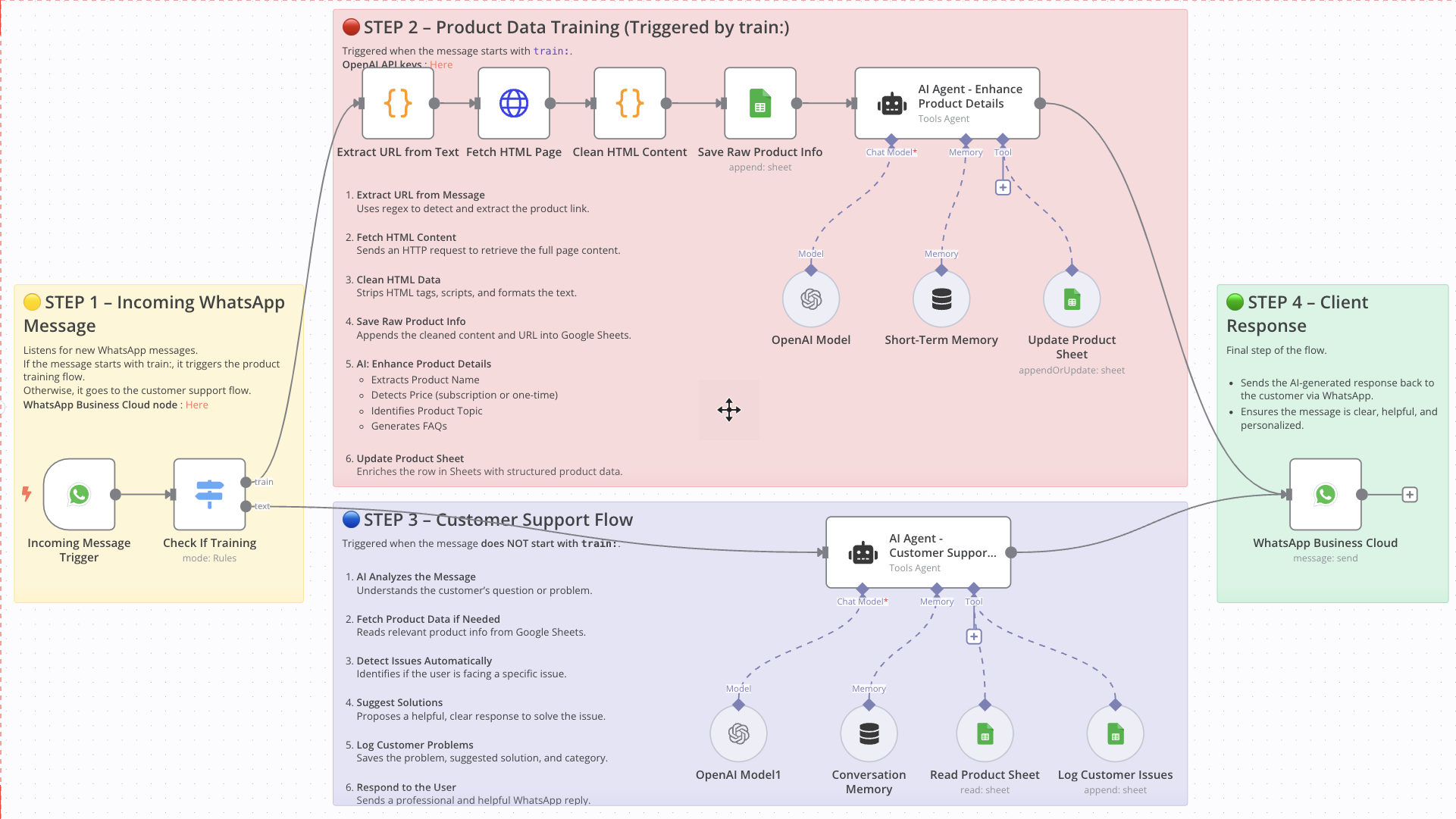
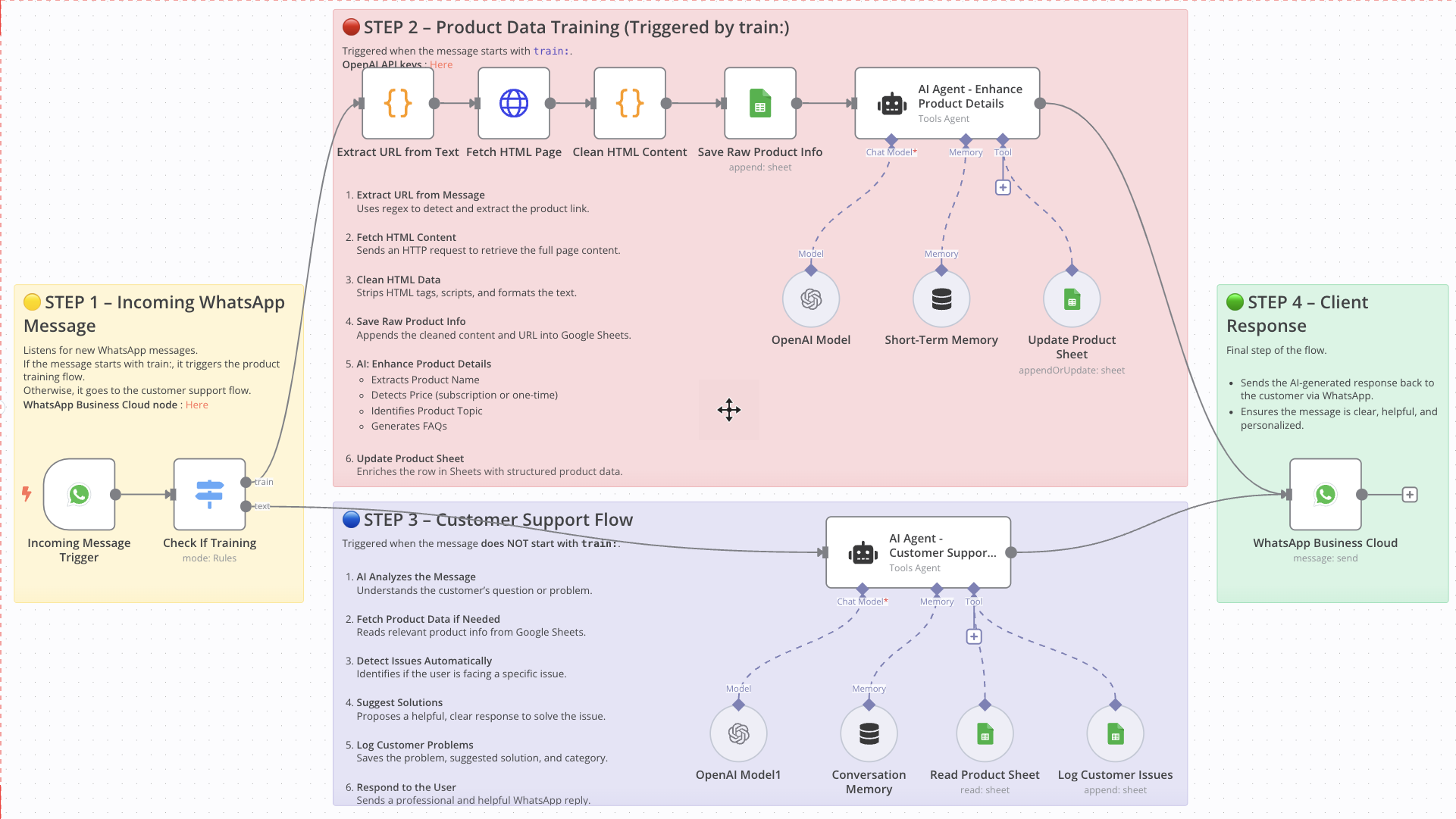 # WhatsApp AI Agent: Auto-Train Product Data & Handle Customer Support ## Who Is This For This workflow is ideal for eCommerce founders, product managers, customer support teams, and automation builders who rely on WhatsApp to manage product information and interact with clients. It’s perfect for businesses that want to automate product data entry and support responses directly from WhatsApp messages using GPT-4 and Google Sheets. ## What Problem Does This Workflow Solve - Manual Product Data Entry: Collecting and organizing product data from links is tedious and error-prone. - Slow Customer Response Times: Responding to client questions manually leads to delays and inconsistent support. - No Logging System for Issues: Without automation, support issues often go undocumented, making it harder to learn and improve. ## What This Workflow Does ### Step 1 – Incoming Message Detection - Listens for incoming messages via WhatsApp. - If the message starts with `train:`, it routes to the product training process. - Otherwise, it routes to the customer support assistant. ### Step 2 – Product Data Training - Extracts URL from the message using a regex script. - Fetches HTML content from the URL. - Cleans HTML data to extract readable product description. - Saves raw data (URL + description) into Google Sheets. - Uses GPT-4 to enhance product data: → Name, price (one-time or subscription), topic, and FAQs. - Updates the product row in Google Sheets with structured information. ### Step 3 – Customer Support Flow - Analyzes user messages with GPT-4 to understand the request or issue. - Looks up relevant product info in Google Sheets. - Detects potential problems (e.g. payment, login, delivery). - Suggests an appropriate solution. - Logs the problem, solution, and category to the `Customer Issues` sheet. - Sends a response back to the client via WhatsApp. ### Step 4 – Client Response - Sends the AI-generated response to the client via WhatsApp. - Keeps the communication fast, clear, and professional. ## Setup Guide ### Prerequisites - WhatsApp Business API access - OpenAI API Key - Google Account with Google Sheets access - A hosted instance of n8n (Cloud or self-hosted) ### Setup Steps 1. Import the Workflow into your n8n instance. 2. Connect your credentials for WhatsApp, OpenAI, and Google Sheets. 3. Customize Google Sheet IDs and names as needed. 4. Test by sending a `train:` message or a regular customer message to WhatsApp. 5. Activate the workflow to make it live. ## How to Customize This Workflow - Edit AI prompts to reflect your product type, language style, or tone. - Change the trigger keyword (e.g. from `train:` to `add:` or anything else). - Add integrations like Notion, Airtable, or CRM tools. - Expand the Sheets structure with more product fields (e.g. stock status, image link). - Add notifications to Slack or email after product updates or issue logging. 📄 Documentation: [Notion Guide](https://automatisation.notion.site/WHATSAPP-WORKFLOW-FULL-1-1c63d6550fd9804d8303c08cd1083587?pvs=4) --- ### Need help customizing? Contact me for consulting and support : [Linkedin](https://www.linkedin.com/in/doctor-firass/) / [Youtube](https:/https://www.youtube.com/@DRFIRASS)
What's Included
- Complete n8n workflow template with 0 nodes. Ready to import and customize.
Requirements
n8n instance (self-hosted or cloud). credentials.
How to Use
1. Download the workflow JSON 2. Import into your n8n instance 3. Configure credentials for 4. Activate and enjoy automation
Apps in this n8n workflow
How to import this template into n8n
- Download the workflow JSON file from this page.
- In n8n, open Workflows, create a new workflow and choose Import from File.
- Open each node that shows a warning and connect your own credentials.
- Run the workflow once manually to check the output before you activate it.
- Importable n8n workflow JSON file
- Download with Builder Pro or Agency Unlimited
- Built for n8n v1.0++
- Setup time: 15-30 min
Included in Builder Pro — $19/mo, 4,177 premium workflows
Before you activate
Templates are reviewed before they are listed. Test with your own credentials and data before running it in production.
100% Secure Checkout
Refund requests within 7 days of a new subscription
Dependencies & Requirements
⚠️ 2 services require credentials. Make sure you have accounts set up before importing.
0 reviews
No reviews yet.
Questions & Answers
Log in to ask a question.
No questions yet. Be the first to ask!
People Also Bought
Related Automation n8n templates
- Generate AI Videos with Google Veo3, Save to Google Drive and Upload to YouTube
- Scrape and summarize webpages with AI
- Create a Branded AI-Powered Website Chatbot
- Angie, Personal AI Assistant with Telegram Voice and Text
- AI agent chat
- Automated Web Scraping: email a CSV, save to Google Sheets & Microsoft Excel
- Respond to WhatsApp Messages with AI Like a Pro!
- Basic Automatic Gmail Email Labelling with OpenAI and Gmail API