Summarize Reply To Slack Channel Messages With Claude AI Assistant
Curated by n8n Markets team
Last updated: June 7, 2026
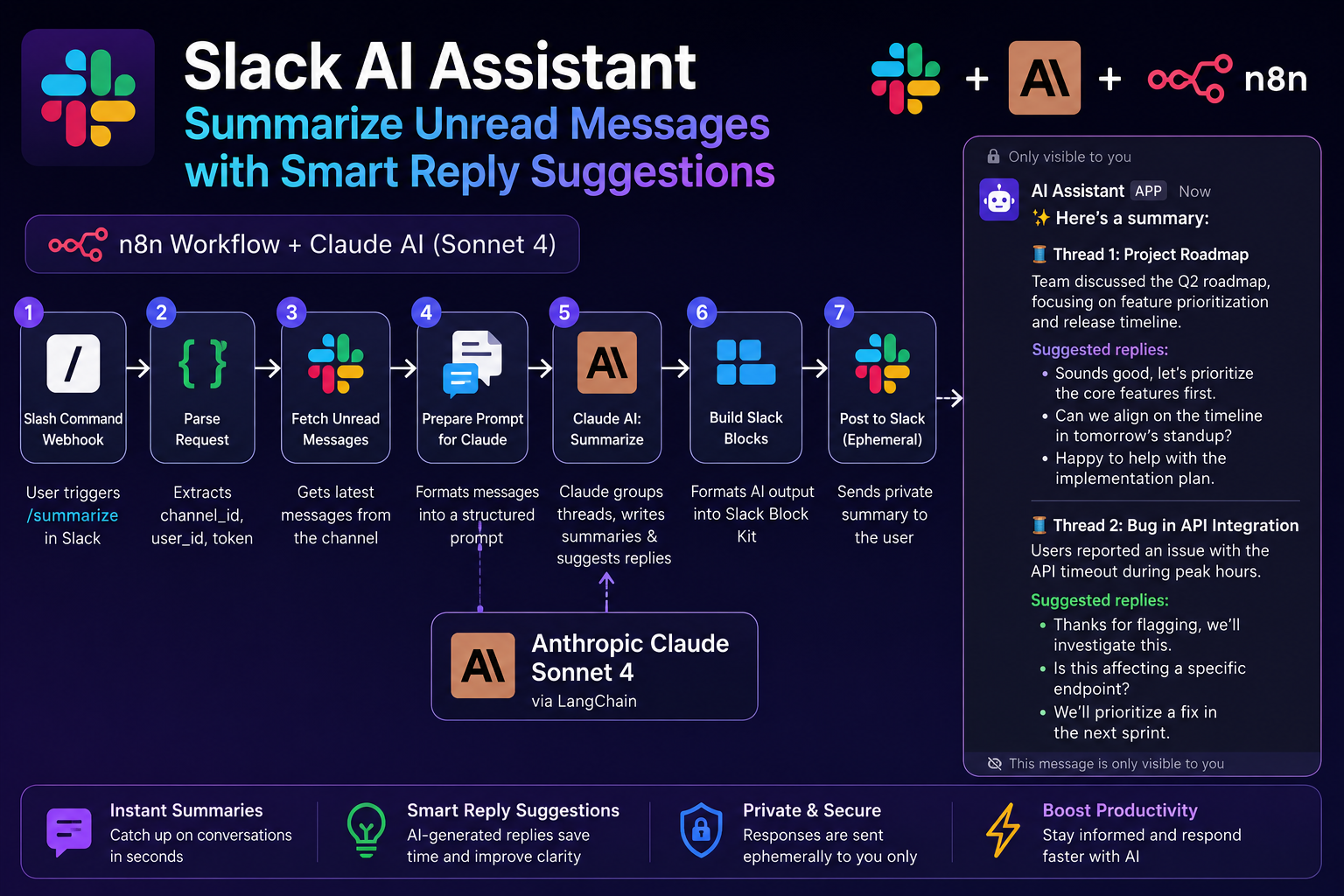
This n8n workflow creates an AI-powered Slack assistant that automatically summarizes unread channel conversations and suggests smart replies using Claude AI. The workflow starts when a user triggers a custom Slack slash command, which sends the request to an n8n webhook. The workflow then parses the Slack request data, including the user ID, channel ID, and authentication token, before fetching the latest unread messages from the selected Slack channel through the Slack API.
What's Included
- Slack slash command webhook integration
- Automatic unread Slack message fetching
- AI-powered conversation summarization using Claude Sonnet 4
- Smart reply suggestions for each discussion thread
- Slack Block Kit formatted responses
- Private ephemeral Slack message delivery
- Anthropic Claude AI integration via LangChain
- Ready-to-use n8n workflow JSON file
- Modular workflow structure for easy customization
- HTTP Request nodes for Slack API communication
- JavaScript code nodes for message parsing and formatting
Requirements
An active n8n account or self-hosted n8n instance A Slack workspace with permission to create apps and slash commands A Anthropic API key for Claude AI access Slack Bot Token with permissions for: channels:history chat:write chat:write.public commands Basic knowledge of Slack App configuration Internet access for API communication
How to Use
Download or import the workflow JSON file into n8n. Create a Slack App in your Slack workspace. Configure a Slash Command (example: /summarize) and point it to your n8n webhook URL. Add the required Slack OAuth scopes and install the app to your workspace. Copy your Slack Bot Token and configure it inside the workflow. Add your Anthropic API credentials in n8n. Activate the workflow inside n8n. Use the slash command inside any Slack channel to generate AI-powered summaries and reply suggestions instantly.
Apps in this n8n workflow
How to import this template into n8n
- Download the workflow JSON file from this page.
- In n8n, open Workflows, create a new workflow and choose Import from File.
- Open each node that shows a warning and connect your own credentials.
- Run the workflow once manually to check the output before you activate it.
- Importable n8n workflow JSON file
- Download with Builder Pro or Agency Unlimited
- Built for n8n v1.0+
Included in Builder Pro — $19/mo, 4,177 premium workflows
Before you activate
Templates are reviewed before they are listed. Test with your own credentials and data before running it in production.
100% Secure Checkout
Refund requests within 7 days of a new subscription
Dependencies & Requirements
⚠️ 1 service require credentials. Make sure you have accounts set up before importing.
0 reviews
No reviews yet.
Questions & Answers
Log in to ask a question.
No questions yet. Be the first to ask!
People Also Bought
Related CRM Integration n8n templates
- SALES — Lead Capture & CRM Auto-Sync
- AI Customer Support Agent — GPT-Powered Webhook Chatbot
- AI Customer Support Automation — CRM + RAG + Multi-Agent AI
- Automated NPS Survey Suite & Google Sheets Feedback Tracker
- Real Estate AI Lead Qualifier — Instant Scoring & Follow-Up for Every Website Lead
- Real Estate AI Lead Qualifier — Instant Scoring & Follow-Up for Every Website Lead
- GHL WhatsApp to HubSpot Ticket Router
- AI Cold Email Outreach Machine | n8n GPT-4 Personalized Email Bot