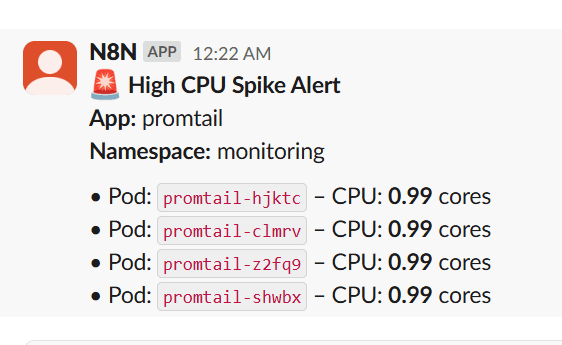
Send real-time Kubernetes(EKS/GKE/AKS) CPU spike alerts from Prometheus to Slack
Curated by n8n Markets team
Last updated: March 8, 2026
## 🧾 Summary This workflow monitors Kubernetes pod CPU usage using Prometheus, and sends real-time Slack alerts when CPU consumption crosses a threshold (e.g., 0.8 cores). It groups pods by application name to reduce noise and improve clarity, making it ideal for observability across multi-pod deployments like Argo CD, Loki, Promtail, applications etc. ## 👥 Who’s it for Designed for DevOps and SRE teams and platform teams, this workflow is 100% no-code, plug-and-play, and can be easily extended to support memory, disk, or network spikes. It eliminates the need for Alertmanager by routing critical alerts directly into Slack using native n8n nodes. ## ⚙️ What it does This n8n workflow polls Prometheus every 5 minutes ⏱️, checks if any pod's CPU usage crosses a defined threshold (e.g., 0.8 cores) 🚨, groups them by app 🧩, and sends structured alerts to a Slack channel 💬. ## 🛠️ How to set up 🔗 Set your Prometheus URL with required metrics (container_cpu_usage_seconds_total, kube_pod_container_resource_limits) 🔐 Add your Slack bot token with chat:write scope 🧩 Import the workflow, customize: Threshold (e.g., 0.8 cores) Slack channel Cron schedule ## 📋 Requirements - A working Prometheus stack with kube-state-metrics - Slack bot credentials - n8n instance (self-hosted or cloud) ## 🧑💻 How to customize 🧠 Adjust threshold values or query interval 📈 Add memory/disk/network usage metrics 💡 This is a plug-and-play Kubernetes alerting template for real-time observability. ## 🏷️ Tags: Prometheus, Slack, Kubernetes, Alert, n8n, DevOps, Observability, CPU Spike, Monitoring ## Prometheus Spike Alert to Slack 
What's Included
- Complete n8n workflow template with 0 nodes. Ready to import and customize.
Requirements
n8n instance (self-hosted or cloud). credentials.
How to Use
1. Download the workflow JSON 2. Import into your n8n instance 3. Configure credentials for 4. Activate and enjoy automation
Apps in this n8n workflow
How to import this template into n8n
- Download the workflow JSON file from this page.
- In n8n, open Workflows, create a new workflow and choose Import from File.
- Open each node that shows a warning and connect your own credentials.
- Run the workflow once manually to check the output before you activate it.
- Importable n8n workflow JSON file
- Download with Builder Pro or Agency Unlimited
- Built for n8n v1.0++
- Setup time: 5-15 min
Included in Builder Pro — $19/mo, 4,177 premium workflows
Before you activate
Templates are reviewed before they are listed. Test with your own credentials and data before running it in production.
100% Secure Checkout
Refund requests within 7 days of a new subscription
Dependencies & Requirements
⚠️ 1 service require credentials. Make sure you have accounts set up before importing.
0 reviews
No reviews yet.
Questions & Answers
Log in to ask a question.
No questions yet. Be the first to ask!
People Also Bought
Related Data Processing n8n templates
- Chat with local LLMs using n8n and Ollama
- Creating an API endpoint
- Proxmox AI Agent with n8n and Generative AI Integration
- Scrape any web page into structured JSON data with ScrapeNinja and AI
- Generate SQL queries from schema only - AI-powered
- N8N for Beginners: Looping over Items
- 🐋DeepSeek V3 Chat & R1 Reasoning Quick Start
- WebSecScan: AI-Powered Website Security Auditor