AI Lead Finder Agent — Find Local Businesses & Auto-Draft Personalized Outreach
Curated by n8n Markets team
Last updated: July 13, 2026
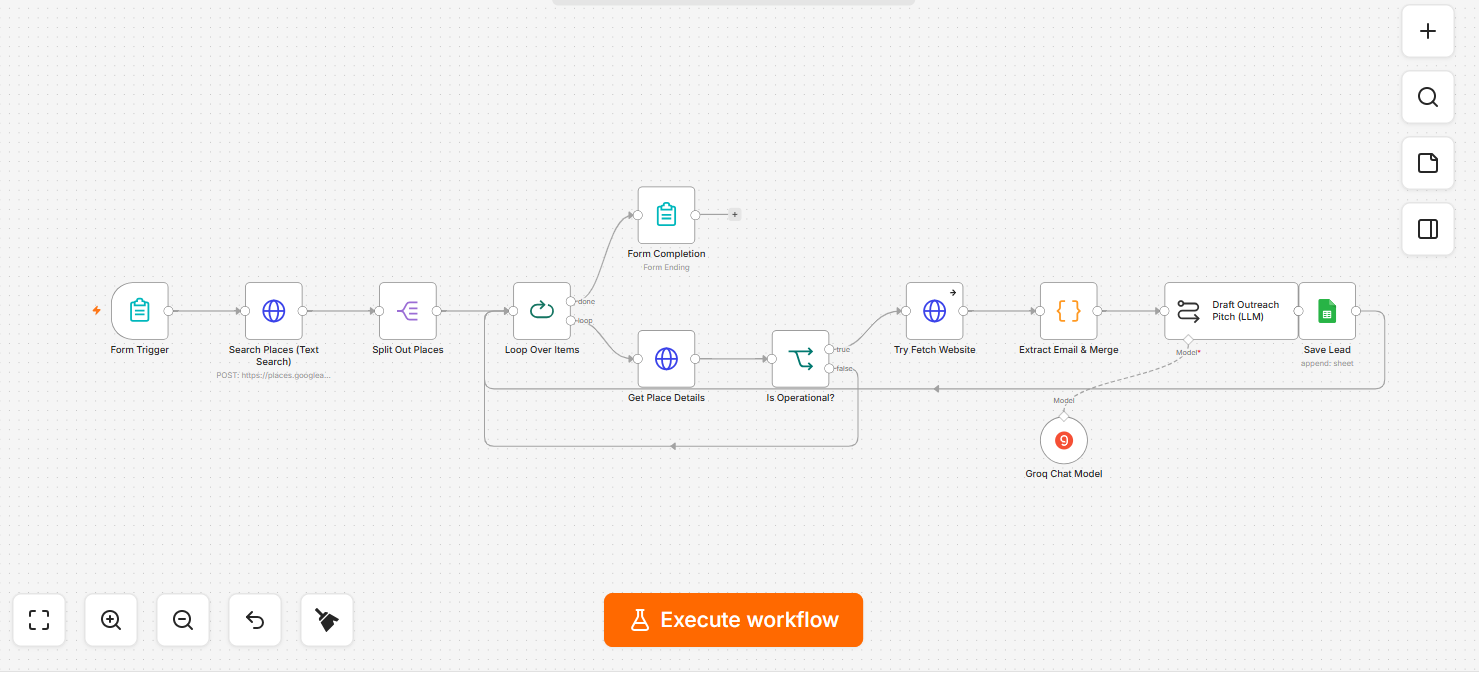
Cold outreach usually fails because it's obviously generic. AI-powered prospecting platforms like Apollo.io or Clay charge $99-300+/month to fix that, bundling a contact database you may not even need. This n8n workflow isolates the part that actually matters: give it a niche (e.g. "plumber", "real estate agent") and a city, and it finds real local businesses, pulls their actual rating and review count, and has AI draft a short outreach message that references specifics from their real profile — proving a human actually looked, not a mail-merge. What it does: 1. Takes niche + city as input (via a simple form) 2. Searches for matching local businesses and pulls name, rating, review count, and website 3. AI drafts a personalized 3-4 sentence outreach opener for each business, grounded in their real rating/reviews 4. Saves every lead + drafted message to a Google Sheet, ready for you to review and send manually Best for: freelancers and agencies doing outbound lead generation who want a faster first draft, not full automation of sending (this tool is built human-in-the-loop by design — it drafts, you review and send).
What's Included
- Full n8n workflow file (.json) — import and go. Setup guide (this description + inline notes in the workflow). Editable AI prompt — already tuned to avoid generic filler phrases and invented statistics. Google Sheets lead template structure.
Requirements
A running n8n instance (self-hosted or cloud). A Google Maps Platform API key with the Places API enabled — Google gives a recurring free monthly usage credit that covers typical prospecting volume, but it does require a Google Cloud account with billing enabled to issue the key. A free Groq API account for the AI drafting step. A Google account for the lead sheet. No coding needed — just credential setup inside n8n.
How to Use
1. Import the .json file into your n8n instance 2. Create a Google Maps Platform API key with the Places API enabled, and add it in n8n as a Header Auth credential (header X-Goog-Api-Key) — the workflow's two Places nodes already point at this credential 3. Add a free Groq API credential for the AI drafting step 4. Connect your Google account and point it to your own copy of the lead sheet 5. Activate the workflow and open the form link it gives you 6. Enter a niche + city, submit, and get a spreadsheet of leads with drafted openers
How to import this template into n8n
- Download the workflow JSON file from this page.
- In n8n, open Workflows, create a new workflow and choose Import from File.
- Open each node that shows a warning and connect your own credentials.
- Run the workflow once manually to check the output before you activate it.
- Importable n8n workflow JSON file
- Download with Builder Pro or Agency Unlimited
- Built for n8n v1.0+
- Setup time: 30 minutes
Included in Builder Pro — $19/mo, 4,177 premium workflows
Before you activate
Templates are reviewed before they are listed. Test with your own credentials and data before running it in production.
100% Secure Checkout
Refund requests within 7 days of a new subscription
0 reviews
No reviews yet.
Questions & Answers
Log in to ask a question.
No questions yet. Be the first to ask!