Automate WhatsApp Booking System with GPT-4 Assistant, Cal.com and SMS Reminders
Curated by n8n Markets team
Last updated: March 8, 2026
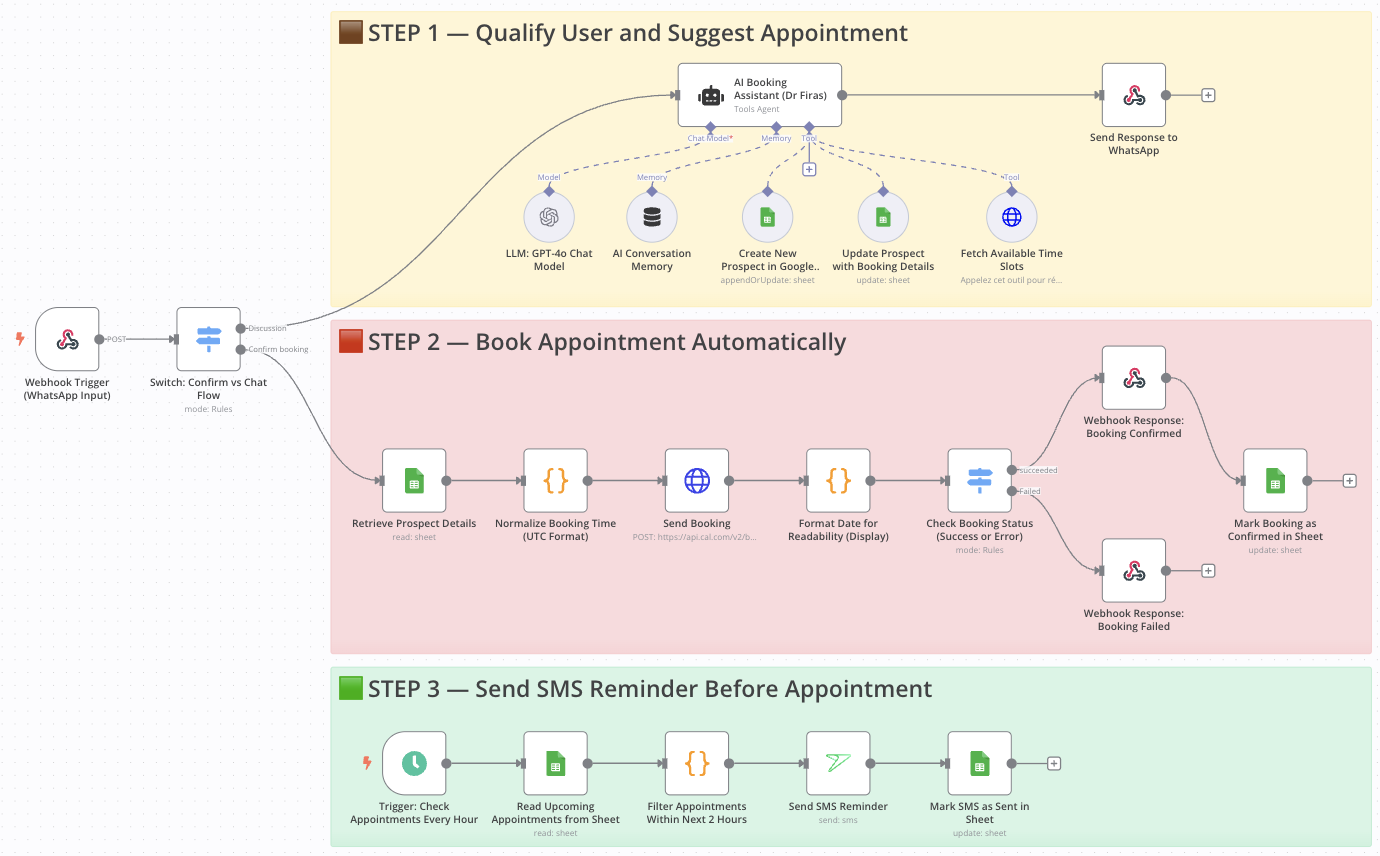
AI-powered WhatsApp booking system with instant SMS confirmations Who is this for? This workflow is designed for solo entrepreneurs, consultants, coaches, clinics, or any business that handles client appointments and wants to automate the entire scheduling experience via WhatsApp — without the need for live agents. What problem is this workflow solving? Responding to inbound messages, collecting booking details, suggesting available times, and sending reminders can be a huge time drain. This workflow eliminates manual handling by: Automating WhatsApp conversations with an AI assistant Booking appointments directly into Cal.com Sending timely SMS reminders before appointments It ensures you never miss a lead or a follow-up — even while you sleep. What this workflow does From a single WhatsApp message, the workflow: Triggers via a WhatsApp webhook Uses GPT-4 to handle conversation flow and qualify the prospect Collects name, email, selected service Calls Cal.com API to fetch available time slots Books the appointment and stores it in Google Sheets Sends a confirmation message via WhatsApp Periodically scans for upcoming appointments Sends SMS reminders to clients 2 hours before their session Setup Connect your Webhook node to a WhatsApp API (e.g., 360dialog, Twilio, or Ultramsg) Add your OpenAI API key for the GPT-4 nodes Configure your Cal.com API key and set your calendar ID Link your Google Sheets with fields like: name, email, date, time, status, reminder_sent Connect your SMS service (e.g., sms77) with API credentials Adjust the schedule in the reminder node as needed How to customize this workflow to your needs Change the language or tone of the AI assistant by editing the system prompt in the GPT node Filter available time slots by service, team member, or duration Modify the reminder timing (e.g., 1 hour before, 24h before, etc.) Add conditional logic to route users to different booking flows based on their responses Integrate additional CRMs or notification channels like email or Slack 📄 Documentation: Notion Guide Need help customizing? Contact me for consulting and support : Linkedin / Youtube
What's Included
- Complete n8n workflow template with 0 nodes. Ready to import and customize.
Requirements
n8n instance (self-hosted or cloud). credentials.
How to Use
1. Download the workflow JSON 2. Import into your n8n instance 3. Configure credentials for 4. Activate and enjoy automation
Apps in this n8n workflow
How to import this template into n8n
- Download the workflow JSON file from this page.
- In n8n, open Workflows, create a new workflow and choose Import from File.
- Open each node that shows a warning and connect your own credentials.
- Run the workflow once manually to check the output before you activate it.
- Importable n8n workflow JSON file
- Download with Builder Pro or Agency Unlimited
- Built for n8n v1.0++
- Setup time: 30-60 min
Included in Builder Pro — $19/mo, 4,177 premium workflows
Before you activate
Templates are reviewed before they are listed. Test with your own credentials and data before running it in production.
100% Secure Checkout
Refund requests within 7 days of a new subscription
0 reviews
No reviews yet.
Questions & Answers
Log in to ask a question.
No questions yet. Be the first to ask!
People Also Bought
Related Automation n8n templates
- Generate AI Videos with Google Veo3, Save to Google Drive and Upload to YouTube
- Scrape and summarize webpages with AI
- Create a Branded AI-Powered Website Chatbot
- Angie, Personal AI Assistant with Telegram Voice and Text
- AI agent chat
- Automated Web Scraping: email a CSV, save to Google Sheets & Microsoft Excel
- Respond to WhatsApp Messages with AI Like a Pro!
- Basic Automatic Gmail Email Labelling with OpenAI and Gmail API