WhatsApp Lead Qualification Automation
Curated by n8n Markets team
Last updated: July 27, 2026
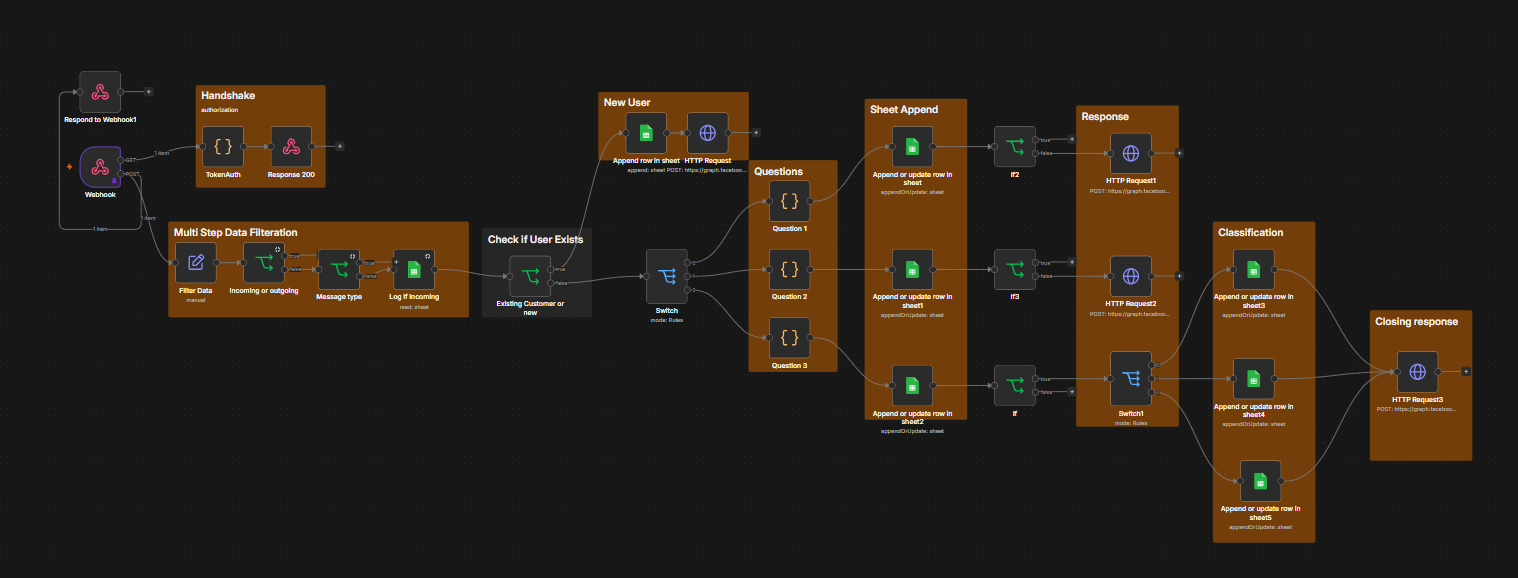
This workflow automates the entire lead qualification process for incoming WhatsApp conversations. When a client messages your business number, the bot walks them through a short, button-based conversation instead of a static form — no typing required. Each response is scored in real time and stored in Google Sheets, and once the conversation is complete, the lead is automatically classified as Hot, Warm, or Cold based on their answers. Hot leads can trigger an instant advisor notification, while warm and cold leads are logged for scheduled follow-up. Built on Meta's official WhatsApp Business Cloud API, this workflow eliminates manual lead triage and ensures every conversation gets a fast, consistent first response — 24/7.
What's Included
- Webhook setup for WhatsApp Cloud API (GET verification + POST message handling)
- New vs. returning lead detection via Google Sheets lookup
- 3-question button-based qualification flow with real-time scoring
- Automatic Hot / Warm / Cold classification logic
- Personalized closing message per lead tier
- Google Sheets integration for lead logging and tracking
- Status-update and non-message webhook filtering (keeps your data clean)
Requirements
n8n instance (self-hosted or cloud) Meta Business Manager account with WhatsApp Business Cloud API access A Meta App with a configured Phone Number ID and access token Google account with Sheets API access (OAuth credential) Publicly accessible webhook URL (ngrok for local testing, or a hosted n8n instance for production)
How to Use
Import this workflow into your n8n instance. Set up your WhatsApp Business Cloud API credentials (Phone Number ID + access token) and connect them to the HTTP Request nodes. Connect your Google account and select/create a spreadsheet with columns: phone_number, name, current_question, score, answers, classification, last_updated. Copy the workflow's Webhook URL and set it as your Callback URL in Meta's App Dashboard, along with a Verify Token of your choice. Subscribe your app to the messages webhook field, and subscribe your WhatsApp Business Account to your app (via Graph API Explorer's /subscribed_apps endpoint). Customize the 3 qualification questions, button options, and scoring thresholds to match your business. Publish the workflow and send a test message to confirm the full flow works end to end.
Apps in this n8n workflow
How to import this template into n8n
- Download the workflow JSON file from this page.
- In n8n, open Workflows, create a new workflow and choose Import from File.
- Open each node that shows a warning and connect your own credentials.
- Run the workflow once manually to check the output before you activate it.
- Importable n8n workflow JSON file
- Download with Builder Pro or Agency Unlimited
- Built for n8n v1.0+
- Setup time: 30 minutes
Included in Builder Pro — $19/mo, 4,177 premium workflows
Before you activate
Templates are reviewed before they are listed. Test with your own credentials and data before running it in production.
100% Secure Checkout
Refund requests within 7 days of a new subscription
0 reviews
No reviews yet.
Questions & Answers
Log in to ask a question.
No questions yet. Be the first to ask!
People Also Bought
Related Social Media n8n templates
- DeepPublish AI: Autonomous News Curator & Multi-Platform Publisher
- $0 AI YouTube Shorts Automation – Reddit to YouTube (Self-Hosted n8n)
- 🤖 Personal AI Assistant (Telegram + n8n) – Manage Gmail & Calendar Automatically
- AI Gaming News Reel Automator for Instagram & TikTok
- AI Content Repurposer — One post becomes 5 platform-ready versions
- Automated YouTube Publisher via Google Sheets & OpenRouter AI (Gemma)
- Fetch Influencer Emails from Instagram Profile
- AI Football News Reel Automator for Instagram & TikTok