Real Estate AI Lead Alert Automation Template (n8n JSON)
Curated by n8n Markets team
Last updated: August 11, 2026
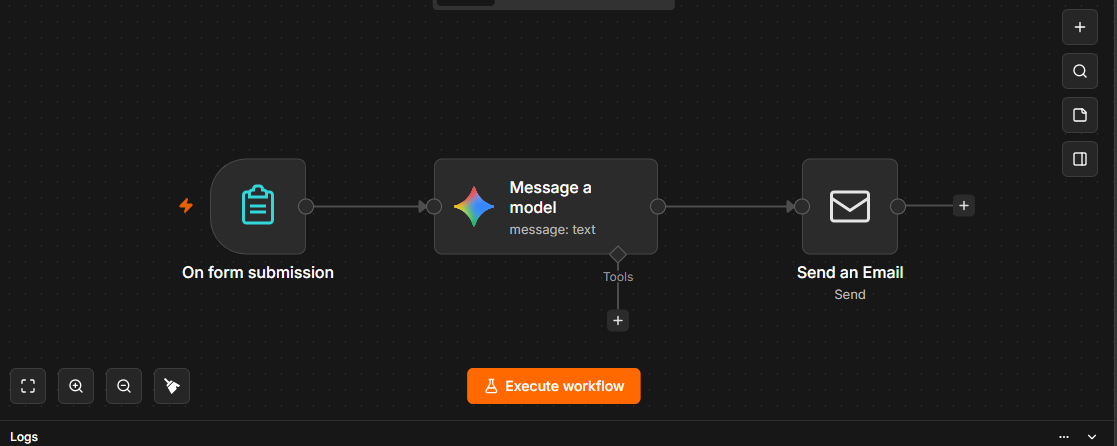
Instantly capture, analyze, and respond to property inquiries before your competitors do. This advanced n8n workflow automates your entire incoming lead pipeline, transforming raw website form submissions into structured, intelligent sales alerts using the power of Google Gemini AI. ### How It Works * **Instant Form Capture:** The workflow triggers immediately when a potential buyer, seller, or renter fills out your website contact form. * **AI Data Extraction & Qualification:** Google Gemini analyzes the unstructured message to automatically extract critical buying signals, including your leads' budget, preferred location, target move-in timeline, and property type. * **Instant Email Alert:** A clean, prioritized summary is delivered straight to your sales team's inbox in under 10 seconds, complete with a recommended follow-up strategy. ### Key Features * **Zero-Lag Response Time:** Outpace competing agencies by receiving qualified insights instantly. * **Streamlined Architecture:** Built on a clean, optimized three-node setup that is easy to manage, scale, and troubleshoot. * **Plug-and-Play JSON:** Fully pre-configured workflow structure designed for rapid deployment.
What's Included
- The complete n8n workflow JSON file
- Step-by-step setup guide
Requirements
* n8n account (Cloud or self-hosted) * Google Gemini API key * Email account (Gmail or SMTP)
How to Use
* **Step 1:** Download the JSON file and log into your n8n account. * **Step 2:** Go to your workflows dashboard, click **Import from File**, and upload the JSON file. * **Step 3:** Open the Google Gemini node and paste your API key. * **Step 4:** Open the email node and connect your email credentials. * **Step 5:** Toggle the workflow from **Inactive** to **Active** (Production), then embed your form link on your website or share it with clients to start capturing leads.
How to import this template into n8n
- Download the workflow JSON file from this page.
- In n8n, open Workflows, create a new workflow and choose Import from File.
- Open each node that shows a warning and connect your own credentials.
- Run the workflow once manually to check the output before you activate it.
- Importable n8n workflow JSON file
- Download with Builder Pro or Agency Unlimited
- Built for n8n v1.0+
- Setup time: 15 minutes
Included in Builder Pro — $19/mo, 4,177 premium workflows
Before you activate
Templates are reviewed before they are listed. Test with your own credentials and data before running it in production.
100% Secure Checkout
Refund requests within 7 days of a new subscription
0 reviews
No reviews yet.
Questions & Answers
Log in to ask a question.
No questions yet. Be the first to ask!
People Also Bought
Related Automation n8n templates
- Generate AI Videos with Google Veo3, Save to Google Drive and Upload to YouTube
- Scrape and summarize webpages with AI
- Create a Branded AI-Powered Website Chatbot
- Angie, Personal AI Assistant with Telegram Voice and Text
- AI agent chat
- Automated Web Scraping: email a CSV, save to Google Sheets & Microsoft Excel
- Respond to WhatsApp Messages with AI Like a Pro!
- Basic Automatic Gmail Email Labelling with OpenAI and Gmail API