Amazon Affiliate Links to Mastodon with AI Descriptions & Shlink Tracking
Curated by n8n Markets team
Last updated: March 8, 2026
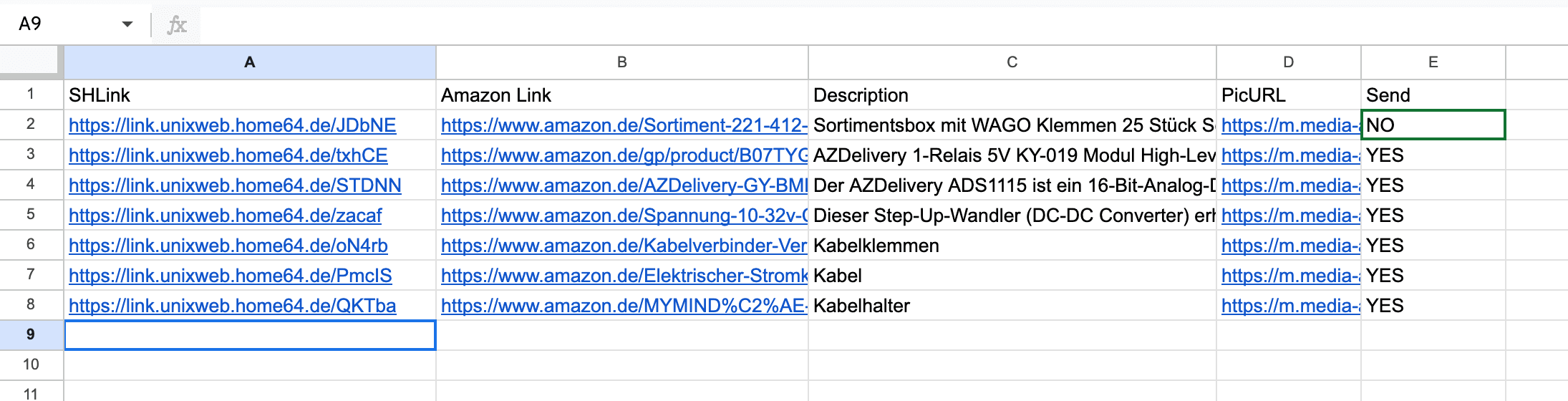
This n8n workflow automates posting Amazon affiliate products to Mastodon — complete with image upload, description, and a shortened tracking URL using Shlink.  🔧 How it works Input Source: The workflow starts by reading from a connected Google Sheet that contains: 1. SHlink (Shortlink) 2. Amazon Link 3. Description (Optional) 4. PicURL 5. Send /NO or YES A Send column (used as a flag to check if the row was already posted)  Image Upload: It fetches the product image via HTTP and uploads it directly to a Mastodon instance via the /media API endpoint. URL Shortening (Shlink): The original Amazon URL is shortened using your self-hosted or cloud-hosted Shlink instance to enable click tracking and better presentation. Text Generation: A two-line promotional text is automatically generated using a Language Model (LLM), based on the product description. Posting to Mastodon: The post is then published on Mastodon with: 1. The image 2. The generated text 3. The shortened Shlink URL Row Update: Once published, the Send column in the Google Sheet is updated to "YES" to prevent duplicates. Requirements ✅ Shlink – Required for shortening and tracking Amazon URLs ✅ Google Sheet – Used as a product queue and post ✅ Google Sheet Example https://link.unixweb.home64.de/w7VqY ✅ Mastodon account – OAuth2 credentials with write scope ✅ Product image URL – Must be valid and accessible ✅ n8n credentials – Set up for Google Sheets, Mastodon, and optionally OpenRouter or other LLM providers This workflow is ideal for content creators, affiliate marketers, and automation fans who want to save time and optimize reach across the Fediverse. #affiliate #amazon #mastodon #advertisment
What's Included
- Complete n8n workflow template with 0 nodes. Ready to import and customize.
Requirements
n8n instance (self-hosted or cloud). credentials.
How to Use
1. Download the workflow JSON 2. Import into your n8n instance 3. Configure credentials for 4. Activate and enjoy automation
How to import this template into n8n
- Download the workflow JSON file from this page.
- In n8n, open Workflows, create a new workflow and choose Import from File.
- Open each node that shows a warning and connect your own credentials.
- Run the workflow once manually to check the output before you activate it.
- Importable n8n workflow JSON file
- Download with Builder Pro or Agency Unlimited
- Built for n8n v1.0++
- Setup time: 5-15 min
Included in Builder Pro — $19/mo, 4,177 premium workflows
Before you activate
Templates are reviewed before they are listed. Test with your own credentials and data before running it in production.
100% Secure Checkout
Refund requests within 7 days of a new subscription
0 reviews
No reviews yet.
Questions & Answers
Log in to ask a question.
No questions yet. Be the first to ask!
People Also Bought
Related Automation n8n templates
- Generate AI Videos with Google Veo3, Save to Google Drive and Upload to YouTube
- Scrape and summarize webpages with AI
- Create a Branded AI-Powered Website Chatbot
- Angie, Personal AI Assistant with Telegram Voice and Text
- AI agent chat
- Automated Web Scraping: email a CSV, save to Google Sheets & Microsoft Excel
- Respond to WhatsApp Messages with AI Like a Pro!
- Basic Automatic Gmail Email Labelling with OpenAI and Gmail API