AI Customer Support Agent
Curated by n8n Markets team
Last updated: July 17, 2026
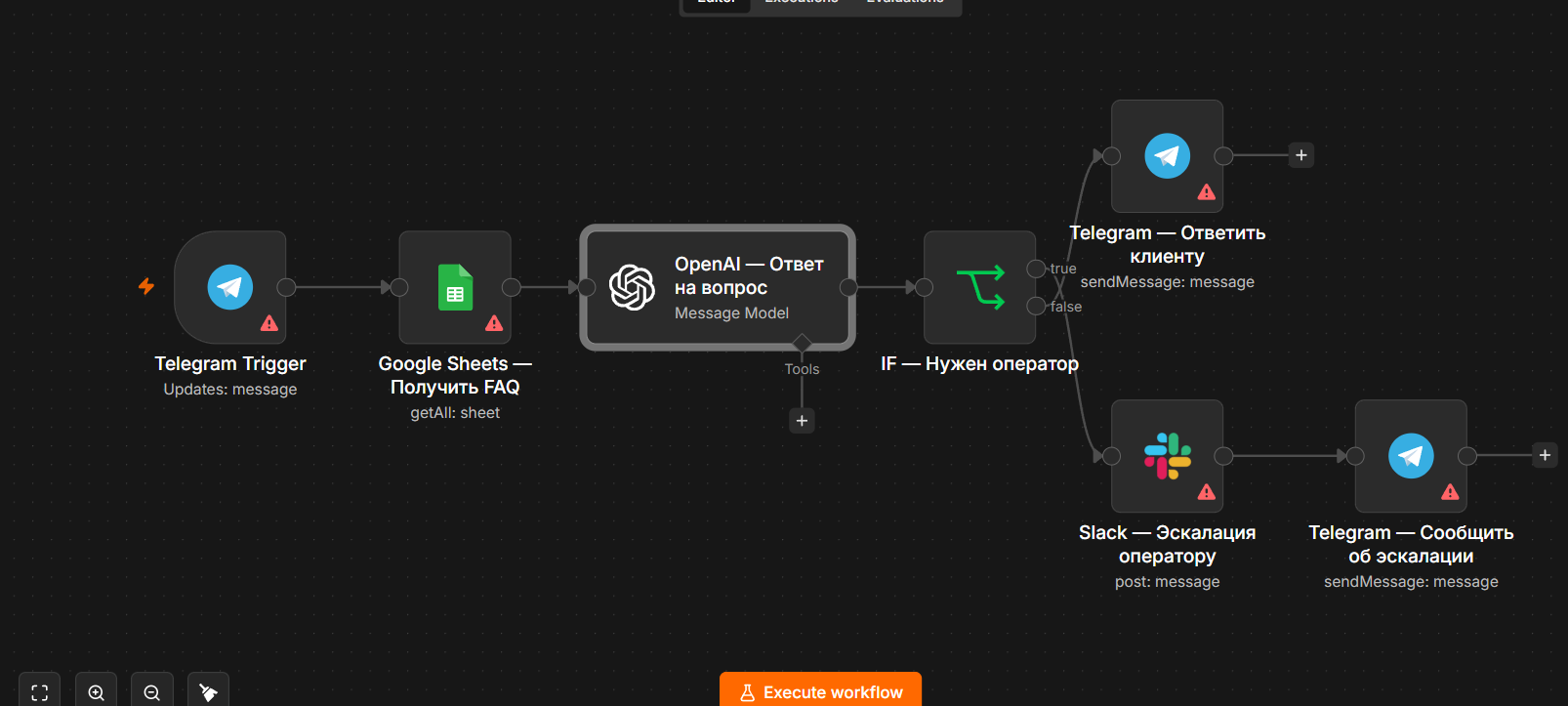
A ready-to-import n8n workflow that answers customer questions in Telegram using your own FAQ knowledge base — day or night, no time off. If the AI can't find an answer, it automatically escalates the question to your team in Slack and lets the customer know a human is stepping in. Best for: online stores, service businesses, local businesses — anywhere customers ask repetitive questions. Requirements to run it: n8n account (self-hosted or cloud), Telegram Bot Token, OpenAI API key, a Google Sheet with your FAQ, a Slack workspace. Format: JSON file, imports into n8n in about 2 minutes. This is a template for self-setup — it does not include hosting, API key configuration, or ongoing support.
What's Included
- 1 n8n workflow (JSON file, ready to import)
- Telegram Trigger node for receiving customer messages
- Google Sheets node for pulling your FAQ knowledge base
- OpenAI node for generating answers based on your FAQ
- Conditional logic (IF node) to detect when escalation is needed
- Slack node for escalating unanswered questions to your team
- Auto-reply node letting the customer know a human is joining
- Step-by-step setup guide (PDF)
Requirements
- n8n instance (self-hosted or n8n Cloud, free tier works) - Telegram Bot Token (free, via BotFather) - OpenAI API key (pay-as-you-go) - Google account with a Sheet formatted as your FAQ (template structure included in the guide) - Slack workspace with a webhook or bot token for escalations - Basic familiarity with importing workflows into n8n
How to Use
1. Download the JSON file after purchase. 2. In n8n, go to Workflows → Import from File, and select the downloaded JSON. 3. Create your Telegram bot via @BotFather and add the Bot Token to the Telegram nodes. 4. Add your OpenAI API key to the OpenAI credential in n8n. 5. Create a Google Sheet with your FAQ (columns: Question, Answer) and connect it via Google Sheets credentials. 6. Connect your Slack workspace and set the escalation channel in the Slack node. 7. Activate the workflow and send a test message to your Telegram bot. 8. Full setup instructions are included in the PDF guide.
Apps in this n8n workflow
How to import this template into n8n
- Download the workflow JSON file from this page.
- In n8n, open Workflows, create a new workflow and choose Import from File.
- Open each node that shows a warning and connect your own credentials.
- Run the workflow once manually to check the output before you activate it.
- Importable n8n workflow JSON file
- Download with Builder Pro or Agency Unlimited
- Built for n8n v1.0+
- Setup time: 15 minutes
Included in Builder Pro — $19/mo, 4,177 premium workflows
Before you activate
Templates are reviewed before they are listed. Test with your own credentials and data before running it in production.
100% Secure Checkout
Refund requests within 7 days of a new subscription
0 reviews
No reviews yet.
Questions & Answers
Log in to ask a question.
No questions yet. Be the first to ask!
People Also Bought
Related Automation n8n templates
- Generate AI Videos with Google Veo3, Save to Google Drive and Upload to YouTube
- Scrape and summarize webpages with AI
- Create a Branded AI-Powered Website Chatbot
- Angie, Personal AI Assistant with Telegram Voice and Text
- AI agent chat
- Automated Web Scraping: email a CSV, save to Google Sheets & Microsoft Excel
- Respond to WhatsApp Messages with AI Like a Pro!
- Basic Automatic Gmail Email Labelling with OpenAI and Gmail API