Generate & Send Spare Parts Price Quotes with Gmail, Sheets and Gemini AI
Curated by n8n Markets team
Last updated: March 8, 2026
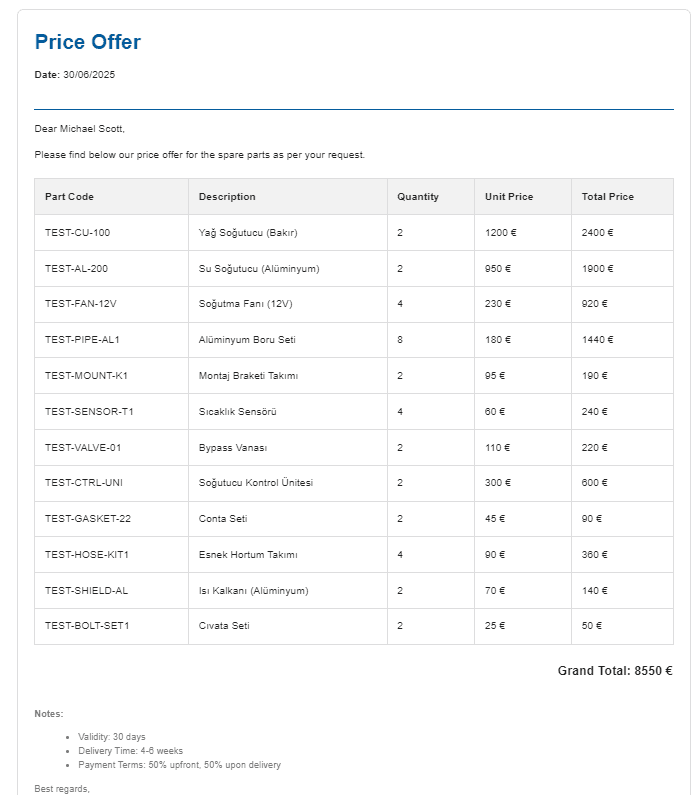
## Who's it for This workflow is perfect for sales teams, customer service departments, and businesses that frequently handle spare parts inquiries via email. It's especially valuable for companies managing multiple products with complex pricing structures who want to automate their quotation process while maintaining professional, multilingual communication.  --- ## What it does This workflow: - Monitors your Gmail inbox for incoming spare parts requests - Automatically generates professional HTML price quotes in the sender's language - Sends personalized replies - Uses AI to detect the email language (supports Turkish, English, German, and more) - Extracts project or part codes - Fetches pricing data from Google Sheets - Calculates totals accurately - Formats everything into a clean, professional quote that matches your brand  --- ## How it works 1. Schedule Trigger runs every minutes to check for new emails 2. Gmail node fetches the latest unread email 3. Keyword detection filters for spare parts-related terms in multiple languages 4. AI Agent processes the request by: - Detecting the email's language - Extracting project/part codes - Querying three Google Sheets: CRM, Bill of Materials, Pricing - Calculating line totals and grand total - Generating a professional HTML quote in the sender's language 5. Gmail reply sends the quote and marks the original email as read --- ## Requirements - n8n self-hosted or cloud instance - Gmail account with OAuth2 authentication - Google Sheets with proper structure (3 sheets for CRM, BoM, and Pricing data) - Google Gemini API key for AI processing - Basic understanding of Google Cloud Console for OAuth setup --- ## How to set up 1. Import the workflow into your n8n instance 2. Create three Google Sheets with the following column structure: - *CRM Sheet*: `Email`, `ProjectCode`, `CustomerName` - *Bill of Materials*: `ProjectCode`, `PartCode`, `PartDescription`, `Quantity` - *Pricing Sheet*: `PartCode`, `UnitPriceEUR`, `PartDescription` 3. Configure credentials: - Set up Gmail OAuth2 in Google Cloud Console - Configure Google Sheets OAuth2 (can use same project) - Get your Google Gemini API key from Google AI Studio 4. Update the workflow: - Replace placeholder Sheet IDs in the CRM, BoM, and Pricing nodes - Adjust company name in the AI Agent’s system message - Modify keyword detection if needed 5. Test with a sample email before activating --- ## How to customize the workflow - Add more languages: Update the keyword detection node with additional terms - Modify the quote template: Edit the HTML in the AI Agent's message to match your branding - Change data sources: Replace Google Sheets with PostgreSQL or MySQL nodes - Add approval steps: Insert a manual approval node for quotes above a certain value - Include attachments: Add PDF or product spec file nodes - Enhance notifications: Add Slack or Teams notifications after quote is sent - Implement follow-ups: Create a separate workflow for reminder emails --- This template provides a solid foundation for automating your quotation process, while staying flexible to fit your specific business needs. *Feel free to contact me for further implementation guidelines:* [LinkedIn: Berke](https://www.linkedin.com/in/berke-celik-a1466a136/)
What's Included
- Complete n8n workflow template with 0 nodes. Ready to import and customize.
Requirements
n8n instance (self-hosted or cloud). credentials.
How to Use
1. Download the workflow JSON 2. Import into your n8n instance 3. Configure credentials for 4. Activate and enjoy automation
Apps in this n8n workflow
How to import this template into n8n
- Download the workflow JSON file from this page.
- In n8n, open Workflows, create a new workflow and choose Import from File.
- Open each node that shows a warning and connect your own credentials.
- Run the workflow once manually to check the output before you activate it.
- Importable n8n workflow JSON file
- Download with Builder Pro or Agency Unlimited
- Built for n8n v1.0++
- Setup time: 5-15 min
Included in Builder Pro — $19/mo, 4,177 premium workflows
Before you activate
Templates are reviewed before they are listed. Test with your own credentials and data before running it in production.
100% Secure Checkout
Refund requests within 7 days of a new subscription
Dependencies & Requirements
⚠️ 1 service require credentials. Make sure you have accounts set up before importing.
0 reviews
No reviews yet.
Questions & Answers
Log in to ask a question.
No questions yet. Be the first to ask!
People Also Bought
Related Automation n8n templates
- Generate AI Videos with Google Veo3, Save to Google Drive and Upload to YouTube
- Scrape and summarize webpages with AI
- Create a Branded AI-Powered Website Chatbot
- Angie, Personal AI Assistant with Telegram Voice and Text
- AI agent chat
- Automated Web Scraping: email a CSV, save to Google Sheets & Microsoft Excel
- Respond to WhatsApp Messages with AI Like a Pro!
- Basic Automatic Gmail Email Labelling with OpenAI and Gmail API