Automated Daily Stock Market Report with Bright Data, GPT-4.1, Airtable/Gmail
Curated by n8n Markets team
Last updated: March 8, 2026
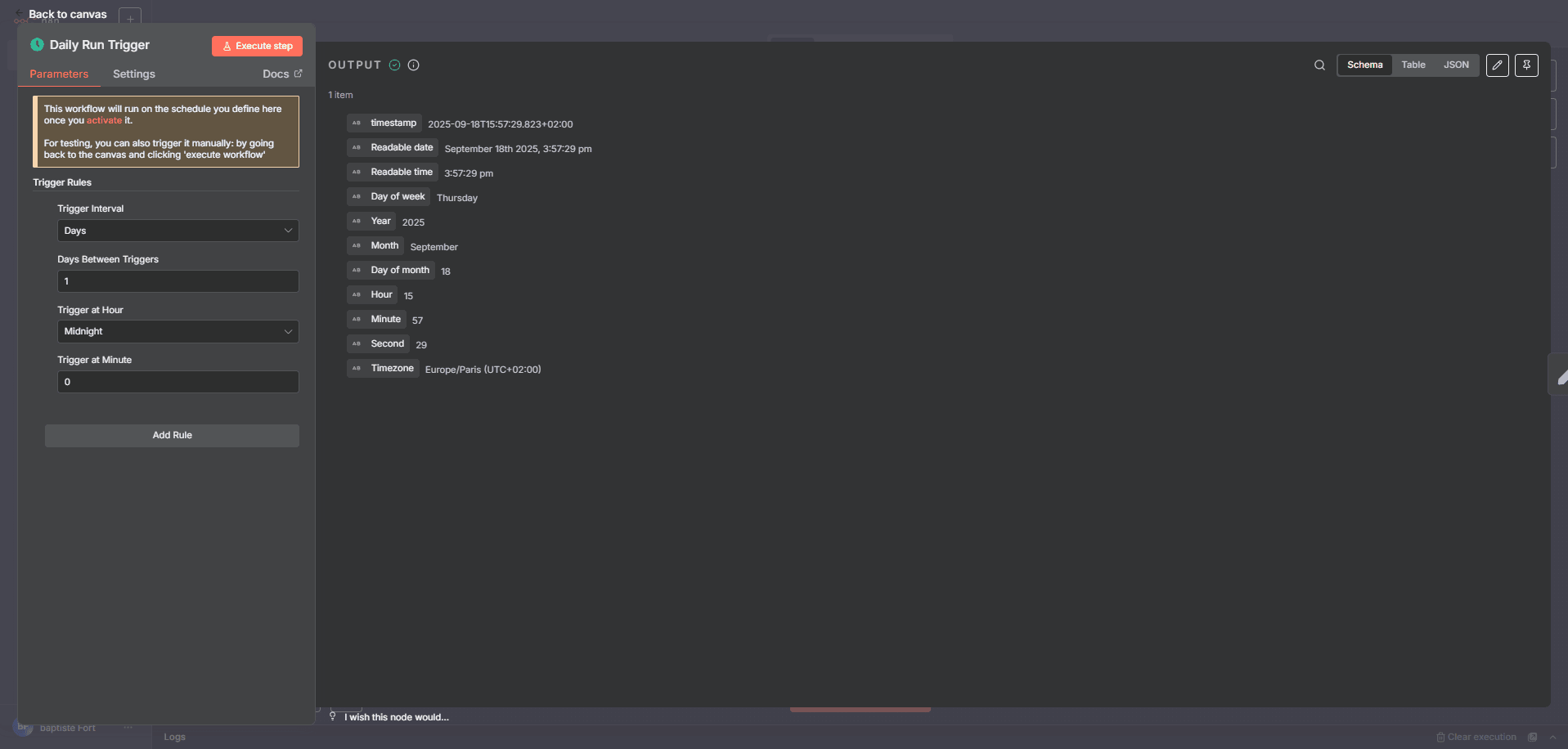
# 📘 Workflow Documentation – Stock Market Daily Digest  ## 👋 Introduction Wake up to a clean, analyst-style stock digest in your inbox—top gainers/losers, a readable performance table, 3–5 insights, and upcoming events—no spreadsheets, no manual scraping, no copy-paste. This article explains, step by step, how to build a robust, daily, end-to-end automation that collects market data (Bright Data), waits until scraping is done, aggregates results, asks an AI model (OpenAI) to draft a styled HTML email, logs everything to Airtable, and finally sends the report via Gmail. You’ll find a friendly but technical tour of every single node, so you can rebuild or adapt the same pipeline with confidence. --- ## 🎯 Who is this workflow for? - Investors & traders who want a quick, readable daily summary. - Finance/Product teams building data-driven alerts/digests. - Consultants & agencies sending recurring client updates. - Automation builders prototyping finance ops quickly. --- ## 🧰 Tools you’ll need - Bright Data — dataset triggers & snapshots for reliable web data. - OpenAI (GPT) — to generate a professional HTML digest. - Airtable — store daily rows for history, filters, dashboards. ### Example Airtable Table: `Daily Stocks` | Ticker | Company | Price | Change % | Sentiment | Date | |--------|--------------------------|---------|----------|-----------|---------------------| | AAPL | Apple Inc. | 225.80 | +1.4% | 🟢 Positive | 2025-09-18 09:00 | | MSFT | Microsoft Corporation | 415.20 | -0.7% | 🔴 Negative | 2025-09-18 09:00 | | NVDA | NVIDIA Corporation | 124.55 | +2.1% | 🟢 Positive | 2025-09-18 09:00 | | TSLA | Tesla Inc. | 260.00 | -3.0% | 🔴 Negative | 2025-09-18 09:00 | | META | Meta Platforms Inc. | 310.45 | +0.5% | 🟡 Neutral | 2025-09-18 09:00 | - Gmail — deliver the final HTML email to stakeholders. - n8n — the automation engine that orchestrates every step. > Keep API keys in n8n Credentials (never hard-code secrets). --- ## 🗺️ Architecture at a glance 1. Schedule fires daily 2. Seed list of tickers 3. Split into one item per stock 4. Prepare keyword for scraping 5. Launch Bright Data job 6. Poll progress with a wait-loop 7. Fetch snapshot data 8. Aggregate for the AI 9. Generate HTML summary (GPT) 10. Save rows to Airtable 11. Send email via Gmail --- # ⚙️ Step-by-step — Every node explained ## ⏰ Daily Run Trigger (Schedule Trigger)  ### Purpose Start the automation at a precise time each day so nobody needs to push a button. ### Parameters (English) - Trigger Type: `Time Interval` or `Cron` - Every X: `1 Day` (or your preferred cadence) - Timezone: `UTC` (or your own) - Start Time: optional (e.g., `09:00`) --- ## 📝 Set Stock List (Set Node – SAMPLE DATA) ### Purpose Define the universe of stocks to monitor. This acts as the seed data for scraping. ### Parameters - Values to Set: `Fixed JSON (array of objects)` - Keep Only Set: `true` - Fields per item: `ticker`, `name`, `market_cap` (you may add `sector`, `isin`, etc.) --- ## 🔀 Split Stocks (Split Out) ### Purpose Turn the array into individual items so each ticker is processed independently (scraping, polling, results). ### Parameters - Operation: `Split Out Items` - Field to Split: the array defined in the previous Set node --- ## 🏷 Prepare Stock Keyword (Set Node) ### Purpose Create a `keyword` field (typically equal to `ticker`) for Bright Data discovery. ### Parameters - Values to Set: `Add Field` - Field Name: `keyword` - Value: use an expression referencing the current item’s ticker (e.g., `` {{ $json.ticker }} ``) --- ## 🕸 Bright Data Scraper (HTTP Request) ### Purpose Trigger the Bright Data dataset to start collecting information for the `keyword`. Returns a `snapshot_id` to poll later. ### Parameters - Method: `POST` - Endpoint: `https://api.brightdata.com/datasets/v1/trigger` - Authentication: `Authorization: Bearer <token>` (header) - Body Fields: - `dataset_id`: your Bright Data dataset ID - `discover_by`: usually `keyword` - `keyword`: the value prepared above > Add a retry/backoff policy on 429/5xx in node options. --- ## 🔄 Check Scraper Progress (HTTP Request)  ### Purpose Poll Bright Data to see whether the snapshot is `running` or `ready`. ### Parameters - Method: `GET` - Endpoint: `https://api.brightdata.com/datasets/v1/snapshots/{snapshot_id}` - Authentication: `Authorization: Bearer <token>` - Expected Output: a `status` field (`running`, `ready`) --- ## ⏳ Wait for Data (Wait Node) ### Purpose Pause between progress checks to avoid rate limits and give Bright Data t
What's Included
- Complete n8n workflow template with 0 nodes. Ready to import and customize.
Requirements
n8n instance (self-hosted or cloud). credentials.
How to Use
1. Download the workflow JSON 2. Import into your n8n instance 3. Configure credentials for 4. Activate and enjoy automation
Apps in this n8n workflow
How to import this template into n8n
- Download the workflow JSON file from this page.
- In n8n, open Workflows, create a new workflow and choose Import from File.
- Open each node that shows a warning and connect your own credentials.
- Run the workflow once manually to check the output before you activate it.
- Importable n8n workflow JSON file
- Download with Builder Pro or Agency Unlimited
- Built for n8n v1.0++
- Setup time: 15-30 min
Included in Builder Pro — $19/mo, 4,177 premium workflows
Before you activate
Templates are reviewed before they are listed. Test with your own credentials and data before running it in production.
100% Secure Checkout
Refund requests within 7 days of a new subscription
Dependencies & Requirements
⚠️ 2 services require credentials. Make sure you have accounts set up before importing.
0 reviews
No reviews yet.
Questions & Answers
Log in to ask a question.
No questions yet. Be the first to ask!
People Also Bought
Related Automation n8n templates
- Generate AI Videos with Google Veo3, Save to Google Drive and Upload to YouTube
- Scrape and summarize webpages with AI
- Create a Branded AI-Powered Website Chatbot
- Angie, Personal AI Assistant with Telegram Voice and Text
- AI agent chat
- Automated Web Scraping: email a CSV, save to Google Sheets & Microsoft Excel
- Respond to WhatsApp Messages with AI Like a Pro!
- Basic Automatic Gmail Email Labelling with OpenAI and Gmail API