AI Customer Support Automation — CRM + RAG + Multi-Agent AI
Curated by n8n Markets team
Last updated: September 10, 2026
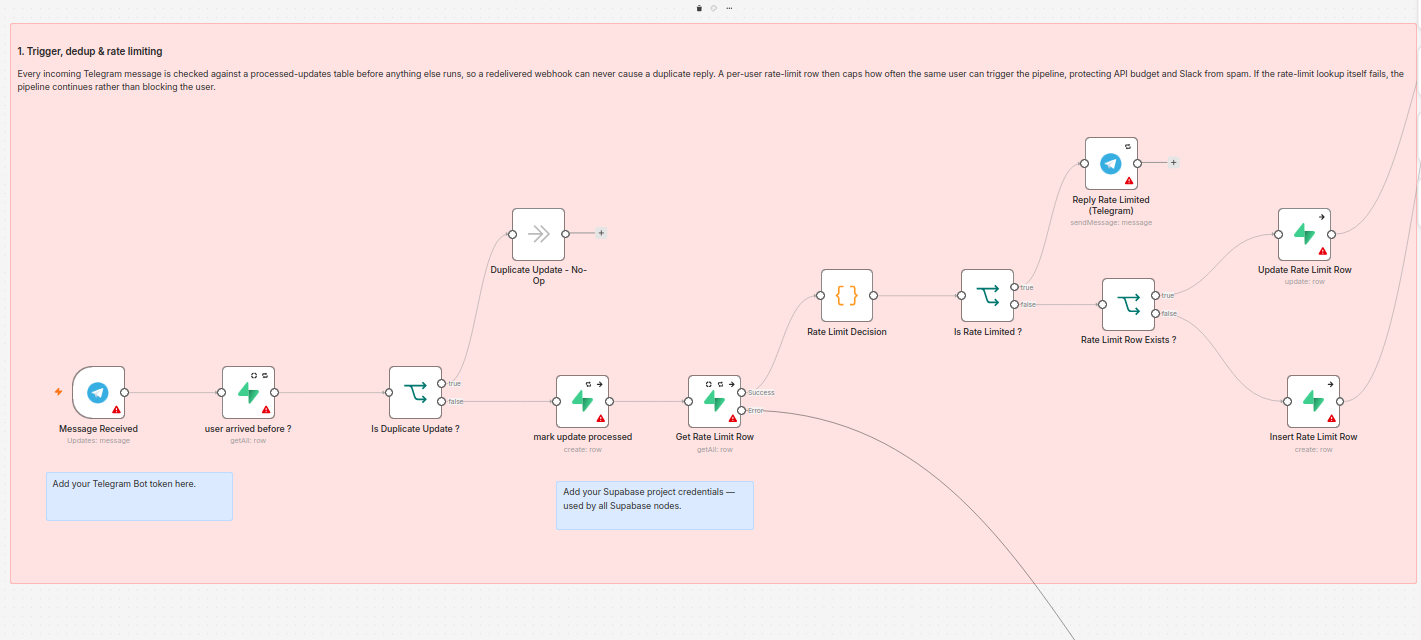
AI Customer Support Automation — CRM + RAG + Multi-Agent System Automate your customer support operations with an AI-powered workflow built on n8n, combining RAG (Retrieval-Augmented Generation), CRM/order data, multi-agent verification, and human escalation. This system is designed for businesses that want to reduce repetitive support work while keeping AI responses grounded, reliable, and connected to their existing customer data. What the Automation Does:- 1. AI Customer Support Agent Automatically receives customer queries through Telegram and uses an AI agent to understand the request and determine the appropriate action. 2. RAG Knowledge Base Connects your business knowledge base to a RAG pipeline using vector search, allowing the AI to answer questions using your actual company information instead of relying solely on general LLM knowledge. 3. CRM & Customer Data Integration Connects the AI workflow with your CRM/customer database to retrieve relevant customer information and maintain context during support interactions. 4. Live Order Lookup The AI can securely retrieve live order information when required, with identity verification before accessing customer-specific data. 5. Multi-Agent AI Verification A second AI agent acts as a Critic/Verifier, checking the primary agent's response against the retrieved information before the response is sent to the customer. This adds an additional quality-control layer and helps reduce unsupported or hallucinated responses. 6. Automated Human Escalation When the AI cannot confidently resolve an issue, it automatically creates a support ticket and escalates the conversation to a human support team. 7. Slack-Based Ticket Management Support agents can receive escalations directly in Slack and resolve tickets using a slash command without requiring a separate admin dashboard. 8. Reliability & Error Handling The workflow includes duplicate detection, rate limiting, retry mechanisms, and fallback notifications to prevent silent failures and unnecessary API usage. Core Technologies:- -n8n -AI Agents / LLMs -RAG -Vector Database -CRM Integration -Customer Data APIs -Telegram -Slack -Supabase -Google Gemini Embeddings -Pinecone -Automated Ticketing -Multi-Agent Verification -API Integration -Error Handling & Retry Logic Ideal For:- -E-commerce businesses -SaaS companies -Customer support teams -Online businesses -CRM-driven businesses -Businesses with large knowledge bases -Companies looking to automate repetitive support operations Business Outcome:- Instead of having an AI chatbot that simply generates answers, this workflow creates an end-to-end AI support automation system: Customer → AI Agent → RAG/CRM Data → Verification → Automated Response or, when human intervention is required: Customer → AI Agent → RAG/CRM Data → Verification → Support Ticket → Slack → Human Resolution
What's Included
- Completely Documented workflow
- AI Agent for automated customer support
- RAG knowledge base integration
- CRM and customer data integration
- Live order lookup
- Customer identity verification
- Multi-agent AI response verification
- Automated support ticket creation
- Slack integration for human escalation
- Telegram customer support integration
- Supabase database integration
- Duplicate message detection
- Rate limiting and API protection
- Automatic retry and error handling
- Fallback notifications
- Human-in-the-loop support workflow
Requirements
-n8n account or self-hosted n8n instance -Telegram Bot and Telegram API credentials -Slack workspace with permission to create a Slack app and slash command -Supabase account and database -Pinecone account and vector index -Google Gemini API key for embeddings -Groq API key for the AI models -Your business knowledge base/documents for RAG -Access to your CRM/order data or API -Basic API credentials for the required integrations
How to Use
-Import the workflow JSON into your n8n instance. -Add your API credentials . -Configure the Pinecone index and connect your RAG knowledge base. -Add your business documents/data to the knowledge base for retrieval. -Configure the CRM/order lookup according to your customer-data API. -Connect your Telegram bot to the workflow and configure the webhook. -Configure the Slack app and /resolve-ticket slash command for human support escalation. -Publish the workflow and send a test customer query through Telegram.
Apps in this n8n workflow
How to import this template into n8n
- Download the workflow JSON file from this page.
- In n8n, open Workflows, create a new workflow and choose Import from File.
- Open each node that shows a warning and connect your own credentials.
- Run the workflow once manually to check the output before you activate it.
- Importable n8n workflow JSON file
- Download with Builder Pro or Agency Unlimited
- Built for n8n v2.30.7++
- Setup time: 30 minutes
Included in Builder Pro — $19/mo, 4,177 premium workflows
Before you activate
Templates are reviewed before they are listed. Test with your own credentials and data before running it in production.
100% Secure Checkout
Refund requests within 7 days of a new subscription
Dependencies & Requirements
⚠️ 1 service require credentials. Make sure you have accounts set up before importing.
0 reviews
No reviews yet.
Questions & Answers
Log in to ask a question.
No questions yet. Be the first to ask!
People Also Bought
Related CRM Integration n8n templates
- Summarize Reply To Slack Channel Messages With Claude AI Assistant
- SALES — Lead Capture & CRM Auto-Sync
- AI Customer Support Agent — GPT-Powered Webhook Chatbot
- Automated NPS Survey Suite & Google Sheets Feedback Tracker
- Real Estate AI Lead Qualifier — Instant Scoring & Follow-Up for Every Website Lead
- Real Estate AI Lead Qualifier — Instant Scoring & Follow-Up for Every Website Lead
- GHL WhatsApp to HubSpot Ticket Router
- AI Cold Email Outreach Machine | n8n GPT-4 Personalized Email Bot